Best Pokemon Card Scanner App? Free Scans, Limits and Export
Check what you can scan, save, and export before you work through a binder.
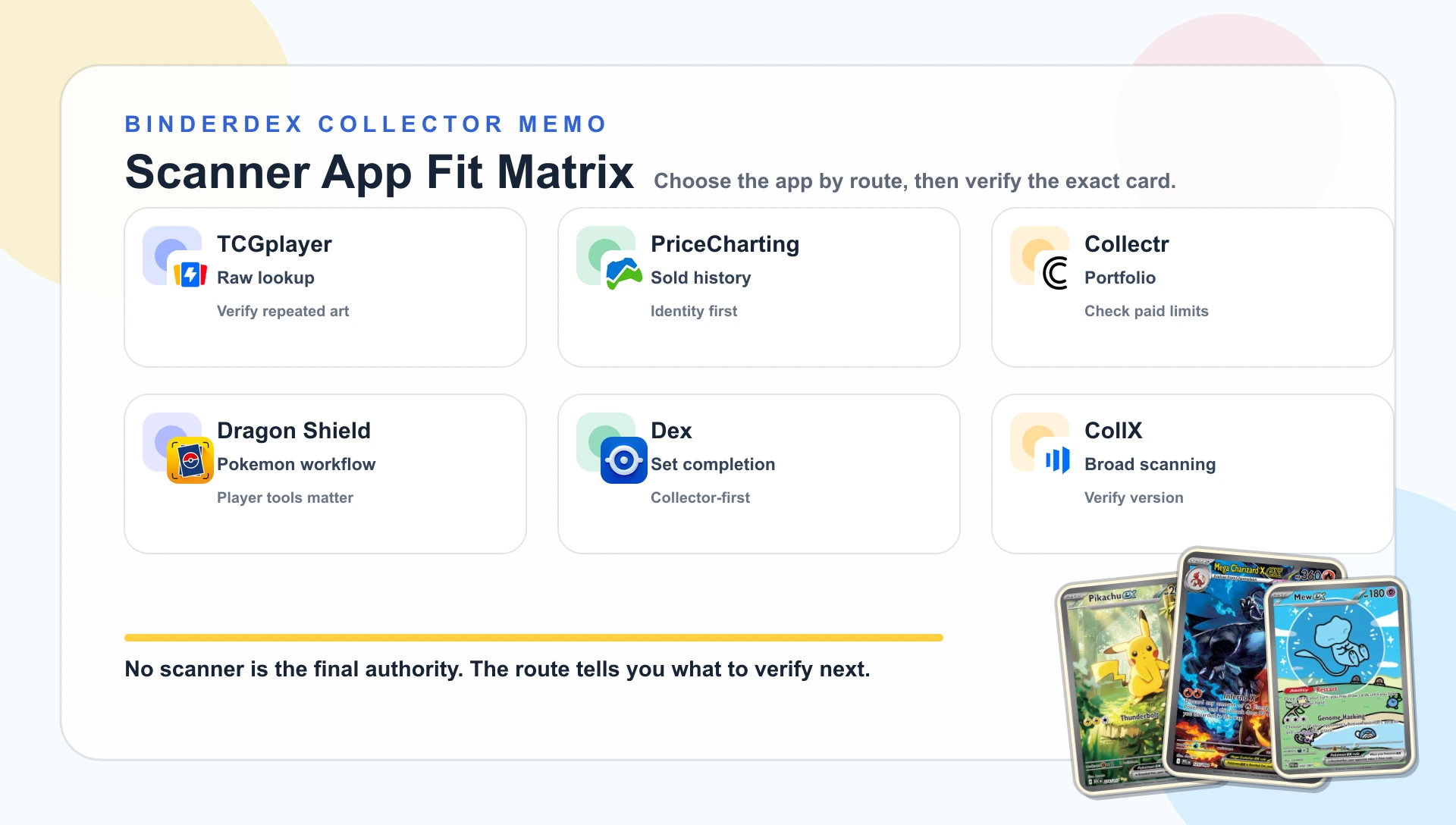
Before you scan a binder, check whether the app will let you keep and export what you scan. TCGplayer documents free scanning and text or CSV export. Dex requires Dex+ for camera scanning and collection CSV export. Collectr lists unlimited scanning and export under PRO; its checked product pages do not specify a free scan allowance.
PriceCharting adds price-guide and completed-sale research, Dragon Shield combines scanning with player tools, and CollX covers mixed sports and TCG collections. The table below separates platform support, documented limits, and the action after identification.
Check the set, full collector number, finish, language, and condition against the card in your hand. If a scanner leaves the printing uncertain, search for the card in BinderDex and compare the result before adding it to a collection.
This is a comparison of documented features and plan limits. We have not run a controlled camera-accuracy test.
- Pick by the action after the scan, not by a vague "best scanner" claim.
- Treat every match as a candidate until the set, number, finish, language, and condition agree.
- Check current plan limits. Several useful scanner or export features sit behind paid tiers.
- Use a separate authenticity review when the card stock, texture, print, or seller photos feel wrong.
Platforms, scan limits, and export
Before you scan a whole binder, check two things: whether the camera feature works on your phone and whether you can take your collection out of the app. A free download does not settle either question.
| App | Platforms | Scanning and plan limits | Collection export |
|---|---|---|---|
| TCGplayer | iOS and Android | Free to use. Scans one card at a time; check the printing before saving it. | Text and CSV. Seller Portal inventory import requires Level 4 seller status. |
| PriceCharting | iOS, Android, and web | Photo search is documented. The current app page does not state a numerical free scan quota. | Free: one import and export per week. Collector and Legendary: unlimited. |
| Collectr | iOS and Android; web portfolio access | Free to start; PRO includes unlimited scanning. The checked pages do not specify the free scan allowance. | Collection export is listed under PRO. |
| Dragon Shield | iOS and Android | Free download with in-app purchases. Check the in-app scanner limits before a large batch. | Google Play documents CSV and text export; it does not specify the required plan. |
| Dex | iOS, Android, and web; camera scanning on iOS and Android | Camera scanning requires Dex+. Free tracking includes unlimited owned cards and all marketplaces. | Collection CSV export is listed under Dex+. |
| CollX | iOS and Android | Free download with in-app purchases. The checked listings do not state a numerical free scan quota. | CSV export requires CollX Pro. |
| BinderDex | iOS, Android, and web | Camera scanning in the mobile app requires BinderDex Pro. | CSV export from the mobile app portfolio requires BinderDex Pro. |
These are the vendors' documented boundaries, checked September 10, 2026. The BinderDex row reflects the app on October 7, 2026. Where a vendor leaves a limit unclear, check the current offer in the app before committing to a long scanning session. Test an export with a few cards first, especially when condition, quantity, and finish need to survive a move.
Already tracking in Collectr? The BinderDex and Collectr comparison covers the collection workflow. If you just need to check a scanner match, search the printed set code and collector number in BinderDex, then compare the result with your card before saving it.
Choose by the next action
The useful question is what you need to do with the card once the camera finds it. A selling route, a set checklist, and a portfolio may begin with the same photo, but they do not need the same app.
What a scanner can and cannot prove
A good scan can turn artwork into a catalog candidate. It may also carry your chosen condition, language, printing, or finish into a list.
The camera cannot feel the card stock, inspect texture under changing light, judge edge wear, or know whether glare hid a reverse holo pattern. It cannot authenticate a card or assign a defensible grade from one front image.
TCGplayer says its app may choose the wrong set when the same artwork appears in multiple printings. PriceCharting tells users to retry or search by keywords when its photo result has low confidence.
The scan gets a card onto the table. The number, set, finish, language, and condition decide what it is.
If the artwork matches but the card still feels wrong, switch tasks. Use the fake Pokemon card checklist before saving a confident collection record; use the condition guide before condition affects a price or trade.
Two near-matches that should slow you down
Scanner marketing sounds cleanest when every card has one image and one record. Real binders are less cooperative.
One illustration, two sets
Base Set Pikachu 58/102 and Legendary Collection Pikachu 86 use the same central illustration. The card number and set treatment separate them.
An artwork-first match can land on the wrong printing. Check the lower corners before comparing value or adding the card to a set checklist.
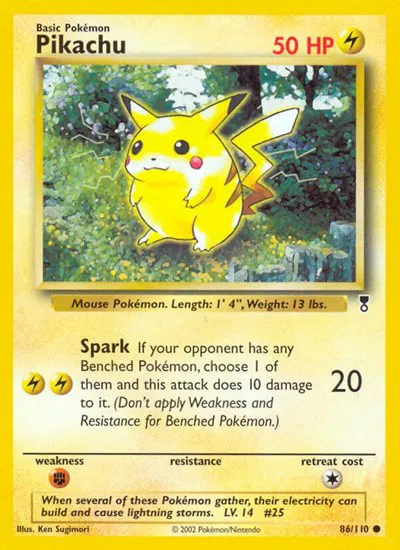
The Legendary Collection printing. Compare its number and set treatment with the linked Base Set Unlimited record.
Price and chart data update with BinderDex · Last refreshed Oct 12, 2026. Editorial commentary reflects the article's published snapshot.
One number, two finishes
Sun & Moon Promo Pikachu SM04 also has a Target non-holo printing. The name and card number alone do not settle the finish.
Tilt the card under light and compare the product record before choosing a price. A scanner result that drops the finish can look convincing while still pointing at the wrong market.
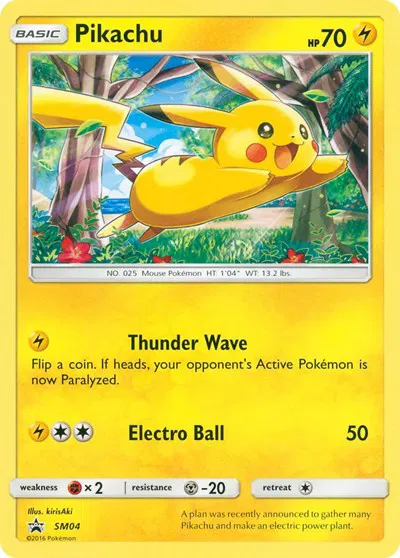
The Target non-holo SM04 printing. Compare it with the linked standard SM04 record before choosing a price.
Price and chart data update with BinderDex · Last refreshed Oct 12, 2026. Editorial commentary reflects the article's published snapshot.
These are ordinary collector problems, not obscure gotchas. A repeatable verification habit matters more than memorizing every reprint.
The collector confidence guide carries that habit into condition and value checks.
Six app notes
 TCGplayer
Best documented fit: raw marketplace lookup
TCGplayer is the direct route when a raw single needs a TCGplayer catalog match and TCGplayer pricing. The app can keep temporary lists, save collection lists, export text or CSV, and send inventory to the Seller Portal for Level 4 sellers.
Its strongest warning is also the most useful one in this comparison. TCGplayer says artwork is central to recognition, so cards with repeated art may be assigned to the wrong set. Verify the version before listing it.
 PriceCharting
Best documented fit: price-guide context
PriceCharting makes more sense after identification. Its app page promises trading-card photo search, a daily-updated database, and collection tracking. Its card pages then separate ungraded and graded guides and display completed sales.
That depth does not make the first photo infallible. PriceCharting's own scanner surface warns about low-confidence results and suggests a new photo or keyword search. I would use it to research a match, not to create certainty.
 Collectr
Best documented fit: multi-TCG portfolios
Collectr is built around the collection that keeps changing. Its scanner page says the app matches set, number, and variant, then adds quantity and condition to a portfolio across Pokemon and other supported TCGs.
The limits deserve a look before a weekend scanning marathon. Collectr lists unlimited scanning, deeper raw and graded history, advanced filters, and export under PRO. The free route is a starting point, not the whole workflow.
If portfolio tracking is the deciding factor, our BinderDex and Collectr comparison separates the two products' collection, watchlist, and mobile workflows. Moving an existing Collectr collection over? How to move a Collectr collection into another app walks through the export and import.
 Dragon Shield
Best documented fit: player and trade tools
Dragon Shield puts scanning beside collection folders, deck building, wishlists, trade lists, translation, and price tracking. That is useful when the card may move into a deck or trade discussion instead of a sales spreadsheet.
Current release notes repeatedly call the feature Pro Scanner. The store copy does not make every plan boundary clear, so check the current in-app offer. Feature names are poor substitutes for a receipt.
 Dex
DexBest documented fit: Pokemon set completion
Dex is the most Pokemon-specific alternative here. It tracks expansions, international cards, reverse holo, first edition, Shadowless, folders, decks, and collection progress.
Dex's scanner help page now documents camera scanning on both iOS and Android with Dex+. The web app supports collection tracking, but the camera scanner is limited to those mobile platforms. The current free plan includes all marketplaces; collection CSV export sits under Dex+.
 CollX
CollXBest documented fit: mixed card piles
CollX is the broad route. Its listing describes a database of more than 20 million sports, TCG, and non-sport cards, with raw and graded matching, collection tracking, historical auction pricing, and marketplace selling.
That makes sense when Pokemon shares the table with baseball cards and slabs. It also puts selling close to identification. Slow down before a broad catalog match becomes a Pokemon listing with the wrong reprint or finish.
Where BinderDex helps after identification
This is a six-app scanner comparison. BinderDex is useful once you have checked a match against the card in hand: use Explore to locate the exact record, then use the set page to keep that record in checklist context.
For example, the Base Set Unlimited checklist and the Legendary Collection Pikachu record make the same-art comparison above visible without treating the first camera match as final.
BinderDex publishes this article, so it does not receive an accuracy or speed rank here. Its relevant paths begin after identification: exact-card research, set checklist context, collection records, portfolio review, and watchlist follow-up.
The goal is one verified record you can keep using. When the scan becomes a pricing decision, follow how to check Pokemon card value instead of treating the first number as a sale price. When a candidate could be a grading submission, use what to check before grading a Pokemon card rather than treating a scan as a condition assessment.
FAQ
Which Pokemon card scanner app is best?
It depends on the task after identification. The six official product pages in this guide document marketplace lookup, price research, portfolio tracking, player tools, set completion, and mixed-card selling workflows; compare the feature and plan details that matter to your own route.
Can a scanner app identify fake Pokemon cards?
It can suggest a catalog match. It cannot authenticate card stock, texture, print quality, or seller photos. Use a separate fake-card review before buying, grading, or saving an uncertain card.
Which Pokemon card scanner apps are free?
TCGplayer documents a free app with scanning and text or CSV export. Several other apps are free to download but reserve features for paid plans: Collectr lists unlimited scanning and export under PRO, Dex requires Dex+ for its camera scanner and CSV export, and CollX reserves CSV export for Pro. Check the table above for the limits each vendor actually states.
What is Collectr's free scan limit?
Collectr's scanner and PRO pages checked for this update do not state a numerical free scan allowance. They list unlimited scanning under PRO. Check the current in-app offer before planning a bulk scan.
Are scanner prices enough for a grading decision?
No. Grading requires a verified printing, condition ceiling, current fees, company fit, and comparable raw and graded sales. A scanner price is one input.
The answer after the scan
A scanner earns trust when it makes the next check easier. Pick the app for the collector job, then let the physical card overrule the camera whenever the set, number, finish, language, or condition disagrees.

Know exactly what is in your collection.
Download BinderDex on iPhone or Android to track exact printings, organize your binders, and follow card and sealed product values in one place.
Prefer mobile?